

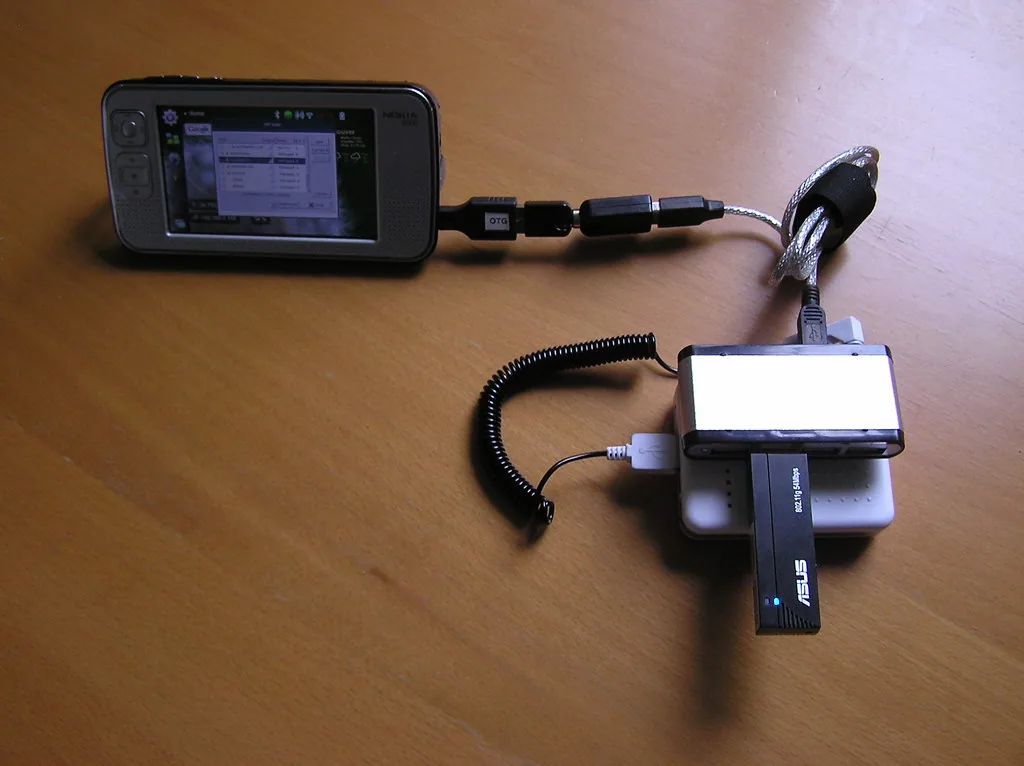
What the hardware has to do
The best WiFi adapter for pentesting in 2026 is not the one with the largest number printed on the box. It is the one whose driver still works after your next kernel upgrade, whose injection code path is complete rather than nominal, and whose radio covers the band your target actually uses. Antenna gain, enclosure colour and the marketing name matter far less than those three things, and almost every bad purchase in this category is a purchase where the buyer checked the first two and ignored the third.
A wireless assessment adapter has to do four separate jobs, and they fail independently of each other.
Monitor mode that survives a reboot. The adapter must hand every 802.11 frame up to the stack with intact radiotap headers, including management frames, control frames, bad FCS frames and frames from BSSIDs the card has never associated with. Plenty of chipsets claim monitor mode and then quietly filter, drop control frames, or corrupt the radiotap channel field. If the radiotap header lies, your capture is worse than useless because your analysis will be confidently wrong.
Injection the driver actually implements. Injecting a raw frame is a different code path from receiving one, and vendors routinely ship receive-only monitor mode. A driver can be perfect at capture and still fail to transmit a forged deauthentication or authentication frame, or transmit it at the wrong rate, on the wrong channel, with a malformed duration field. This is the single most common reason a card that looks fine in a scan produces nothing when you test it.
A driver that lives where your kernel lives. This is the technical detail that separates every pick below. Adapters built on MediaTek and Atheros silicon generally have mainline kernel support — the mt76 family for MediaTek and ath9k_htc for Atheros — which means the driver ships with your distribution and is maintained against current kernels. Adapters built on Realtek silicon generally do not, so they rely on an out-of-tree module rebuilt through DKMS against every kernel change. Out-of-tree is not automatically disqualifying; the aircrack-ng project maintains usable Realtek drivers. But it is a maintenance tax that breaks silently on a rolling distribution, and a card that needs a rebuild every few weeks is a card you will eventually stop updating and start mistrusting.
Bands, streams and physical build. A 2.4 GHz-only card cannot see a 5 GHz-only network, and a 6 GHz-capable card is the only way to passively discover modern 6 GHz access points, because those APs advertise themselves to clients on other bands using Reduced Neighbor Report and a non-6E client may never learn they exist. Spatial streams affect how much you can capture at once on wide channels. USB 3.0 matters if you intend to capture 80 or 160 MHz channels without losing frames, and USB 2.0 is a genuine bottleneck for the four-stream cards. Detachable RP-SMA connectors matter if you plan to use a directional or panel antenna, because a soldered internal antenna converts a good card into a mediocre one.
Before you trust any adapter, verify it yourself rather than trusting the product page.
lsusb
lsusb -v 2>/dev/null | grep -i -E 'idVendor|idProduct|bcdDevice'
iw list | grep -A12 'Supported interface modes'
sudo ip link set wlan0 down
sudo iw dev wlan0 set type monitor
sudo ip link set wlan0 up
sudo iw dev wlan0 info
sudo iw dev wlan0 set channel 36 HT40+
sudo aireplay-ng --test wlan0
If iw list does not show monitor under supported interface modes, stop there. If aireplay-ng --test reports that injection is working, you have a usable card. If it reports a partial result, you have a card that will waste an afternoon in the field. Also confirm that NetworkManager or systemd-networkd is not quietly reassociating the interface behind you, and check dmesg after plugging in so you know which module actually bound to the device.
Scope and authorisation. Monitor mode, injection and everything downstream of them are only lawful against networks you own or have explicit written permission to test. Permission needs to name the SSIDs or BSSIDs, the bands and channels, the time window, the permitted techniques and the person who can authorise them, and it should come from someone with the authority to grant it. Radio does not stop at a property boundary: your frames land on neighbouring networks and on clients that belong to other people, and deauthentication or rogue access point testing on a shared or public band can affect third parties who never agreed to anything. Check your local regulations on transmit power and permitted channels as well, because high-power adapters are frequently sold configured for a different regulatory domain than yours, and running one at maximum output is a licensing question, not just a technical one.
The comparison table
These are the adapters that are currently in production and currently worth considering. Chipset, not model name, is the deciding column — retailers quietly swap silicon inside the same SKU, so confirm what is inside the box before you buy. For context on how this shortlist has moved, our earlier round-up of WiFi adapters for wireless auditing is still useful reading, as long as you check the current chipset rather than assuming the model number tells you anything.
Model          Chipset    Bands        Driver        Inject   Pick it for
-----------    --------   ----------   -----------   ------   -------------------
AWUS036ACM     MT7612U    2.4 / 5      mt76x2u       Good     Everyday default
AWUS036AXML    MT7921AU   2.4/5/6      mt7921u       Varies   6 GHz and WPA3 work
AWUS036ACH     RTL8812AU  2.4 / 5      rtl8812au *   Strong   Range and power
AWUS036NHA     AR9271     2.4          ath9k_htc     Best     Reliable injection
AWUS1900       RTL8814AU  2.4 / 5      rtl8814au *   Strong   Long-range capture

* out-of-tree DKMS module, needs a rebuild on every kernel change
Detailed picks
Alfa AWUS036ACM — the default choice. MediaTek MT7612U, dual-band, USB 3.0, driven by the in-kernel mt76x2u module. It is the least interesting adapter here and that is exactly the point: it survives distribution upgrades without intervention, monitor mode behaves consistently, and detachable antennas let you swap in something directional. Injection works rather than excelling. Buy this if you want one card that will still be working, unmodified, after your next two kernel jumps. Verify the injection rate with aireplay-ng --test before relying on it for anything timing-sensitive.
Alfa AWUS036AXML — the one for 6 GHz. MediaTek MT7921AU, tri-band including 6 GHz, in-kernel mt7921u. If your engagement brief includes WPA3-only networks, 6E access points, or clients using protected management frames, you need a radio that can hear those beacons in the first place, and this is the mainstream path to that. Treat the injection column as a question rather than an answer: the mt7921u driver supports monitor mode well and raw transmission varies by kernel version and firmware, so test on your actual distribution and keep a 2.4 GHz card alongside it for the work that has to be reliable. If you want the same silicon cheaper, generic MT7921AU dongles exist from several vendors — the chipset is the specification, so judge the listing by the chipset and the connector, not the brand.
Alfa AWUS036ACH — range and brute force. Realtek RTL8812AU, dual-band, USB 3.0, running on a DKMS module maintained outside the mainline tree. It has more transmit headroom and better receive sensitivity than the compact cards, which matters for long-range capture and for anything that needs a strong, repeatable injection. The trade-off is the maintenance burden and the heat: this chipset runs warm, and a cheap unpowered hub will cause it to drop off mid-capture. Budget for a powered hub and for occasionally rebuilding the module.
Alfa AWUS036NHA — the injection reference. Atheros AR9271, 2.4 GHz only, in-kernel ath9k_htc. Nothing here will impress anyone on a datasheet, but this chipset has the most thoroughly exercised injection implementation in the ecosystem, because it has been used for it continuously for well over a decade. It is the card you reach for when a capture-dependent technique has to work first time and the band is 2.4 GHz. It cannot see 5 GHz, which is the whole reason you own more than one adapter.
Alfa AWUS1900 — the long-reach option. Realtek RTL8814AU, four spatial streams, dual-band, USB 3.0, again DKMS. Useful when you need maximum receive sensitivity from a fixed position, for example capturing a client population from a car park or a neighbouring building within your authorised scope. It needs a powered USB 3.0 port, it gets hot, and the out-of-tree driver is the same ongoing tax as the AWUS036ACH. Buy it as a specialist second card, not as your only card.
The pattern across all five is deliberate: one mainline 2.4/5 GHz workhorse, one 6 GHz card for modern targets, and optionally one high-power or high-reliability specialist. Two or three cards in a bag cover more ground than one expensive card chosen for its headline number.
What we would not buy
- Any adapter whose listing will not name the chipset. If the seller describes it as AC1200 or AC1300 and never says which silicon, you cannot predict the driver situation, and the answer will change between production runs of the same product.
- TP-Link TL-WN722N revisions after v1. The original revision used the Atheros AR9271 and became a minor legend. Later revisions moved to a Realtek part that does not offer the same behaviour, and the model number stayed identical. If you find one second-hand, check the revision. If you cannot, assume it is not what the reputation describes.
- Cheap RTL8811CU and RTL8812BU mini dongles marketed for Kali. These are the most common impulse purchase in the category. Monitor mode is usually present, injection is often partial or unstable, and the DKMS module breaks on kernel changes. They are fine as a second 5 GHz radio for passive capture and frustrating for anything that transmits.
- Bundles advertised as a complete pentesting kit. You are paying a markup for an unbranded adapter, a short USB cable and a copy of instructions you already have. Buy the adapter, buy a powered hub, buy a decent antenna, keep the difference.
- Adapters that require a vendor Windows utility to enable monitor mode. If monitor mode only exists inside a proprietary control panel, it does not exist for your tooling, and it will not survive an OS change.
- Anything already discontinued but still listed as current. Older high-power cards with excellent reputations are frequently out of production and only available as remaining stock at inflated prices, with no driver maintenance and no warranty path. Verify the product is still manufactured before you pay a premium for a reputation.
The defender’s view
The uncomfortable truth for defenders is that a monitor-mode adapter is almost invisible. It does not associate, it does not authenticate, it does not request an address, and it transmits nothing at all. A passive capture produces no log entry on the access point, no DHCP lease, no authentication event and nothing for a client-side agent to report. If your wireless detection strategy depends on spotting monitor mode, you do not have one.
What you can detect is the active phase, which is where most of the damage happens anyway.
- Management frame abuse. Deauthentication and disassociation floods show up as anomalous volumes of unauthenticated management traffic. If your access point or controller can log management frames, enable it, ship it to your SIEM and alert on bursts and on repeated deauth frames to the same client.
- Protected management frames. Enforce 802.11w on WPA2 networks and run WPA3-only where your clients support it, rather than WPA3 transition mode. Forged deauthentication is ineffective against a client that has negotiated PMF, and transition mode exists precisely to be downgraded against.
- Rogue and evil twin access points. Watch for a BSSID advertising a corporate SSID from an unexpected OUI, from an unexpected location, or on a channel that no sanctioned AP uses. This is the highest-value wireless alert you can build, because it is the technique most likely to succeed against staff.
- Enterprise authentication. Evil twin attacks against WPA2-Enterprise succeed when clients do not validate the RADIUS server certificate. Require EAP-TLS with strict server certificate validation on managed devices, and treat any client configured to trust any certificate as a finding in its own right.
- The rogue adapter on the endpoint. A USB WiFi adapter plugged into a corporate laptop creates a second, unmanaged network path that no NAC policy and no firewall rule covers. Use USB device control or allowlisting, and alert on new wireless network interface creation in endpoint telemetry. The physical variant matters too: an adapter left plugged into a meeting room machine is a bridging device waiting for someone to use it.
- Do not count hidden SSIDs or MAC filtering as controls. Neither is a defence against any of the above, and treating them as one is how wireless assessments keep producing the same findings year after year.
Buy the adapter that survives your next kernel update, test its injection before you trust it, and write the authorisation down before the first frame leaves the antenna. The hardware is the easy part.
Image credit: Qole Tech, licensed under CC BY 2.0.